
Measuring the render phase duration of React components
So you've read React Performance tracks, profiled your application and are not sure what to do next. Let's take an examples from the React article, Video.
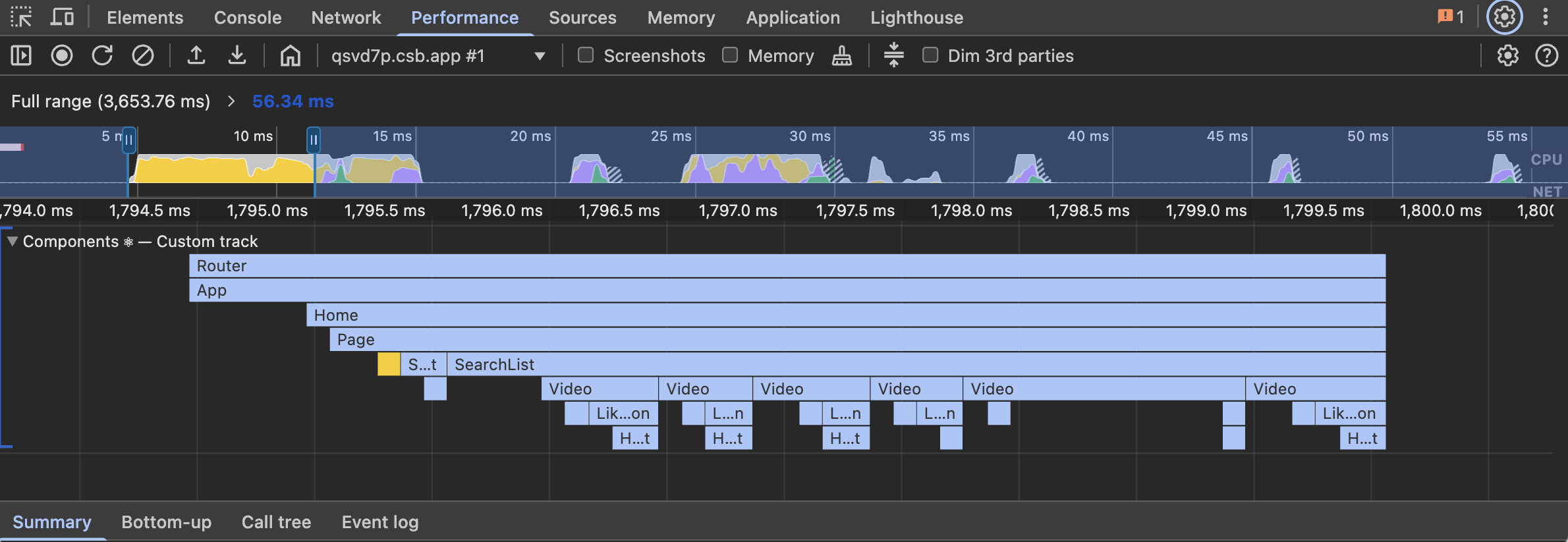
With our hypothetical Video component, the fifth instance is taking twice as long to render as any other instance. To get a better grasp on what's going wrong, we should benchmark the component directly:
const Video = () => {
  const before = performance.now();
  // Some expensive code...
  const after = performance.now();
  console.log("Video:", `${(after - before).toFixed(2)}ms`);
  // Video: 9.15ms

  return (
    <div>
      {/* ... */}
    </div>
  )
};
If you have a component that re-renders many times, or is rendered in many places, you may want to capture the average render time - particularly useful for components that demonstrate a significant difference in their render time:
let average = 0;
let counter = 0;

const Video = () => {
  const before = performance.now();
  // Some expensive code...
  const after = performance.now();

  const diff = after - before;
  average = (counter + diff) / 2;
  counter += 1;

  console.log(`Video:  render ${counter} | time ${(after - before).toFixed(2)}ms | average: ${average.toFixed(2)}ms`);
  // Video: render 1 | time: 9.15ms | average: 9.15ms
  // Video: render 2 | time: 8.55ms | average: 8.85ms
  // Video: render 3 | time: 9.02ms | average: 8.93ms
  // ...
  // Video: render 9 | time: 8.88ms | average: 8.90ms

  return (
    <div>
      {/* ... */}
    </div>
  )
};